
Smart Bulbs vs. Smart Switches and Dimmers: A Home Lighting Control Guide
Why Smart Lighting Feels Complicated – And How to Clear the Confusion
Walk through any home improvement store lighting aisle and you’ll find two smart lighting camps: vivid color-changing bulbs and sleek wall switches promising whole-room control. Likewise, shopping for smart lighting options online and perusing reviews often add more noise: Do wall switches cut off power to smart bulbs? Do smart bulbs fail when the Wi-Fi drops out?
By the end of this guide, you’ll know exactly how smart bulbs work with wall switches, when to choose smart bulbs over smart wall switches or dimmers, and how to build rock-solid home lighting control that delights guests and save you money and peace of mind.
Smart Lighting 101: Quick Definitions
Below is a table outlining the differences between smart light bulbs, smart wall switches, and smart wall dimmers:
| Type | Example Image | What It Is | How It Works | Why You Might Choose It |
|---|---|---|---|---|
| Smart Bulb |  |
A light bulb with its own wireless radio (Wi-Fi, Zigbee, etc) | Screws into a standard socket and joins your network directly, no wiring changes required | • Fast DIY install • App, voice, & automation control • Full-range dimming and often 16-million-color tuning |
| Smart Switch |  |
A wall-mounted on/off paddle with a built-in wireless radio | Replaces a traditional switch; controls the circuit's power while staying network-connected | • Uses regular non-smart LED bulbs • Keeps the wall switch intuitive for guests • Works locally even if the internet goes down (with a compatible hub) |
| Smart Dimmer |  |
A smart switch that also modulates voltage to vary brightness to lights on that circuit | Installs in the wall box; uses dimming hardware plus smart logic, can use regular non-smart dimmable LED bulbs | • All smart switch perks plus smooth dimming from wall, app, or voice • Preset brightness levels for scenes like "Movie Time" or "Night Light" |
A note on architectural and commercial lighting systems: This post covers the consumer and prosumer smart lighting landscape — smart bulbs, switches, and dimmers that most homeowners can purchase and integrate themselves. Whole-home and commercial projects sometimes call for more sophisticated control systems: Lutron’s RadioRA 3 and HomeWorks QSX tiers, Vantage by Legrand, DALI protocol-based systems, and Loxone, which offers deep lighting integration as part of its whole-building automation platform and is one of the systems we work with directly. If your project is trending toward that tier, that’s a separate and very worthwhile conversation — just not the one this post is having.
Smart Bulbs vs. Smart Switches & Dimmers: Busting Four Costly Myths
Myth 1: Smart Bulbs Fix Every Fixture
Smart bulbs excel at rapid color changes, quick DIY installations, and portability, which are perfect for bedside lamps, accent lights, and holiday décor. However, they stumble when it comes to ceiling fans or multi-bulb fixtures that are controlled by a single wall switch; turn off the switch and turn off the power to your smart bulbs along with it, thus forfeiting any remote or automation control configured for those bulbs.
Myth 2: You Need Fancy Smart Bulbs for Smart Control
A smart wall switch (or dimmer) is the smart device, not the bulb. A smart switch/dimmer replaces your existing wall paddle and adds a radio for network communication (Wi-Fi, Zigbee, or Matter). That means you can pop in any standard dimmable LED bulb and still enjoy schedules, app/voice control, and automation scenes. Guests get the familiar tap-to-turn-on experience, while you keep full remote control, no pricey color-changing bulbs or “Leave On” stickers affixed to wall paddles required.
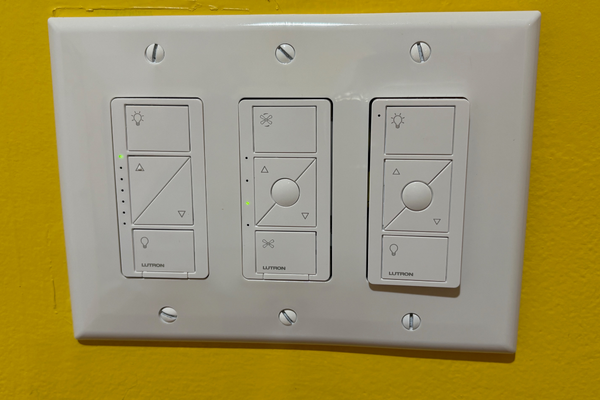
Lutron Caseta smart dimmer and fan switches
Myth 3: You Must Pick One Technology
The strongest smart lighting automation plans blend both worlds. Bulbs handle lamps and ambiance; smart dimmers rule multi-bulb fixtures, exterior floodlights, and fixtures where replacing the bulb is a non-starter. Hybrid setups respect budgets, simplify use, and stay online during when there are internet connectivity issues.
Myth 4: Smart Lights Need the Internet to Work
Choose Zigbee-ready bulbs or switches that speak locally to centralized hubs like mini PCs running Home Assistant rather than bulbs or devices that need access to cloud-based services. Your lights will keep working even when the cloud quits, routines will continue running themselves, and everyone from small children to overnight guests continue receiving dependable control via app, voice, remote, or physical switch.
Motion Sensors: The Tiny Add-On That Supercharges Smart Lighting
Pair any smart bulb or switch with a battery-powered motion sensor and watch the value and flexibility of your lighting setup skyrocket.
| Core Benefit | Who Notices? | Real-World Impact |
|---|---|---|
| Safety & Security | Families, renters, late-night visitors | Hallways, stairs, and entryways light automatically, no stumbling or additional liability |
| Energy Savings | Anyone paying the light bill | Lights switch off when rooms sit empty, reducing costs over time |
| Convenience | Folks experiencing rushed mornings, client-facing spaces | Routines run on autopilot; the ambiance adjusts itself |
| Accessibility | Elders, small children, folks managing autism, ADHD, and sensory challenges | No need to reach for or remember to toggle switches |
| Guest & Client Experience | Vacationers, salon customers, home buyers, prospective tenants | Walk-in lighting feels professional and welcoming |
| Reduced Maintenance Costs | Property managers, landlords, short-term rental hosts | Fewer dark corridor complaints and light bulb checks |
| Scalability | Growing families, those with expanding real estate portfolios | Sensors can evolve with your needs without taking on an entire rewiring project |
Motion-sensor activated smart bulbs at the top of a set of basement steps
Quick-Reference Cheat Sheet & Three Foolproof Tweaks
Smart Bulbs vs. Smart Switches/Dimmers at a Glance
| Feature | Smart Bulbs | Smart Switches/Dimmers |
|---|---|---|
| Installation | Plug-and-play | Requires wiring into wall junction box |
| Flexibility | Swap bulbs between lamps quickly | Fixed once installed |
| Fixture Control | One bulb or grouped bulbs | Entire circuit or multi-fixture banks |
| Offline Reliability | Often cloud-dependent unless connected to a local hub | Often cloud-dependent unless connected to a local hub |
| Customization | Rich color, scenes, and more granular dimming | Circuit-wide dimming, limited colors depending on installed light fixtures |
| Guest-Friendly | Often need apps and voice to control | Familiar wall switch control |
3 Tweaks That Guarantee Foolproof Lighting Control
- Pick a Local Protocol: Zigbee or Wi-Fi bulbs with a local API keep lights responsive even when the internet drops.
- Skip the “Do Not Turn Off” Stickers: Smart switches feel familiar and intuitive, and no need to provide guests with an instructional lesson for operating your lights.
- Group with Intent: Merge devices for bedroom fixtures into a “Goodnight” scene; tie exterior lights to astronomical timers for dusk-to-dawn peace of mind.
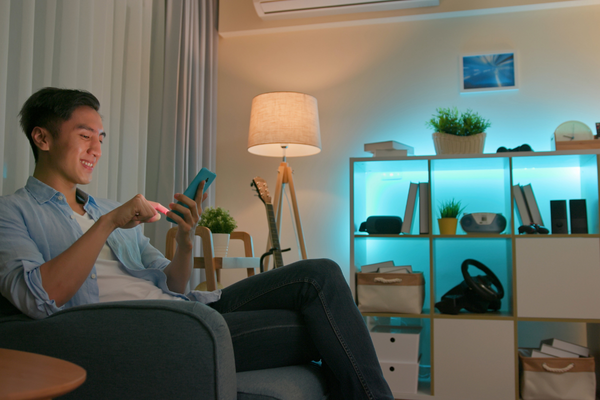
Motion-activated lighting powered by smart bulbs
Ready to Light Smarter? Book Your Next Step
Stop guessing and start glowing. Book a free 30-minute discovery call and I’ll talk through a room-by-room lighting plan tailored to your household, including the accessibility, sensory, and routine considerations generic checklists miss. In-person assessments cover South Jersey, Southeastern PA, and Northern Delaware. The Remote Safety Snapshot is available anywhere in the world.