How I Built a Privacy-First Smart Pet Monitoring System for My Senior Cats
How I Built a Privacy-First Smart Pet Monitoring System for My Senior Cats
I shared my home with two senior cats, Lily and Zuma. When one of them began showing signs of stomach trouble, I needed clearer insight into their daily routines so I could step in quickly — and know for certain which cat was actually having the problem.
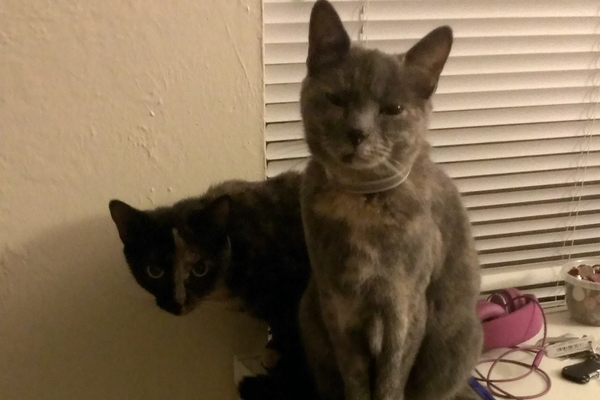
My cats Lily & Zuma
Why Guessing Which Pet Is Sick Isn’t Good Enough
Both cats used a shared laundry room “pet suite” for food and litter. I couldn’t tell whether it was Lily or Zuma who was in distress — and while I had my suspicions, I needed to know for certain. Giving the wrong cat treatment wastes time, money, and sometimes makes things worse.
I ended up building a smart pet monitoring setup that stayed 100% private while showing me exactly who was entering the litter area, when, and for how long. No cloud storage. No subscription. Just the answers I needed.
A Plan to Help Someone You Love Stay in Their Home.
Built for people in their 50s renovating once and wanting to do it right, families after a fall or a discharge, and anyone supporting an aging parent who wants a clear next step. The Planning Ahead track of the Home Safety and Technology Assessment is a 90 to 150 minute walkthrough covering fall prevention, nighttime safety, daily routines, and where smart home technology actually helps. Within 5 business days you get a prioritized written report, a review call, and warm referrals to the OTs, PTs, and contractors who fit your situation. In-person in South Jersey, Southeastern PA, and Northern Delaware.
The 3-Component Local Pet Monitoring Setup I Built in a Day
- Private-by-Design Hardware
- Aqara Zigbee door sensors on each pet door flap
- A Reolink indoor camera aimed at the litter zone
- Home Assistant running locally for full data ownership
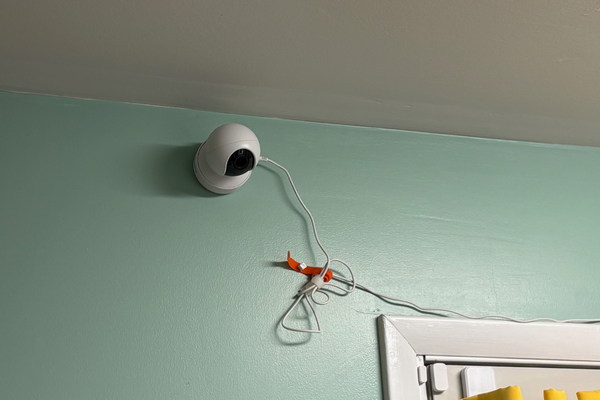
Camera affixed to indoor wall that points at cat food and litter area
-
Simple Entry/Exit Automation Logic
One flap is configured to open “IN,” and the other opens only in the “OUT” direction. When the IN sensor trips, Home Assistant tells the camera to record a video clip — saved on servers running in my own home, not uploaded to any cloud.
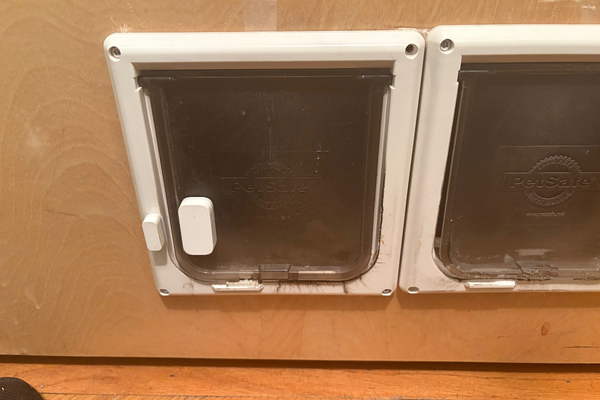
Contact sensors affixed to the doggy door flaps
-
Tuned Recording Length to Save Storage
Early tests filled the drive fast, so I trimmed the automation to a 45-second window: long enough to capture who walked in and what they did, short enough to stay manageable on local storage.Brief recording of Zuma triggered after she entered the laundry room via the doggy flaps affixed with contact sensors
What Local Pet Monitoring Caught That Guessing Never Could
Within 24 hours of the system going live, the footage told me everything:
- I identified that Zuma — not Lily — was experiencing distress
- I shared exact timestamps and video clips with her vet, which sped up her diagnosis significantly
- We avoided unnecessary treatment for Lily and reduced stress for both cats
- Every frame of footage stayed on-site — my non-negotiable for every Serenity Smart Homes install
Sadly, Zuma has since crossed the rainbow bridge. But knowing I caught her symptoms early and made her final days more comfortable is something I wouldn’t trade for anything. That same system now helps me stay ahead of Lily’s health with the same level of care and the same commitment to privacy.
The smart home content actually worth reading
Why Local Storage Beats Cloud Pet Cameras for Sensitive Footage
When a pet is sick, you’re dealing with footage of vulnerable moments — the last thing you want is that video living on Amazon’s or Google’s servers, subject to their privacy policies and law enforcement data requests. Consumer Reports has documented exactly how Ring and other cloud camera brands handle police requests for footage — and the short answer is that cloud storage means someone else ultimately controls access to your recordings.
Local storage through Home Assistant means:
- Your footage is yours. No third-party access without your involvement.
- No subscription required. You’re not paying monthly to keep access to your own recordings.
- Vet-shareable clips on demand. Because footage is stored as standard video files, you can pull exact clips with timestamps and share them directly — a far more useful diagnostic tool than a verbal description.
This is exactly the kind of practical privacy benefit that gets overlooked when people default to commercial pet cameras. The Wyze, Furbo, or Petcube ecosystems are convenient — but they come at a cost that goes beyond the monthly fee.
How to Replicate This Smart Pet Monitoring Setup in Your Home
You don’t need to be a smart home expert to build something like this. Here’s what the core setup requires:
- Home Assistant (running on a Home Assistant Green, Raspberry Pi, or local server)
- Aqara Zigbee door/contact sensors (or any Zigbee-compatible contact sensor)
- Reolink indoor camera with RTSP stream support
- Local storage — a NAS, USB drive attached to your hub, or home server
The automation logic is straightforward: sensor trips → camera records → clip saves locally. Clip duration and trigger conditions can be fine-tuned after your first few days of testing.
If you’d rather not DIY it, this is exactly the kind of setup Serenity Smart Homes builds for clients — customized for your floor plan, your pets, and your privacy requirements.
Want a Smart Pet Monitoring System Built for Your Home?
Whether you have dogs, cats, or any other furry family member, Serenity Smart Homes can design a local, subscription-free pet monitoring setup that fits your space. Book a free 30-minute discovery call and I’ll listen to what your pets, and your peace of mind, actually need. The Planning Ahead Home Safety and Technology Assessment is available in-person across South Jersey, Southeastern PA, and Northern Delaware. The Remote Safety Snapshot is available anywhere in the world.