
Smart Home Move-In Consulting for a New Build in Las Vegas: Getting It Right Before Day One
How one homeowner moving into a builder smart home used remote consulting to cut cable, protect her network, and build a privacy-first plan — before she even had the keys in hand.
Moving Into a Builder Smart Home — With Someone Knowledgeable in Your Corner
There’s a particular window of opportunity that most new-build homeowners never take advantage of: the weeks before closing. The walls are still accessible. The wiring map is still in someone’s hands. The builder’s tech team will walk you through everything at closing — but only once, quickly, and without much interest in your long-term privacy or flexibility.
That’s exactly the situation one homeowner found herself in ahead of her move into a new construction home in the Las Vegas area. An attorney by profession, she was sharp, prepared, and not easily rattled. But the technology side of a new home — builder-installed smart features, network wiring she’d never seen, cable subscriptions she wanted to ditch, and a housemate whose federal job required a hard-wired internet connection — was a lot to untangle alone.
She had a DIY security system from her previous home she never actually used, and she had been controlling her lights with an old-fashioned lamp timer she’d been manually resetting with the seasons. She wasn’t starting from zero, but she also knew she didn’t know what she didn’t know. The question wasn’t whether technology could help her — it was who she could trust to give her honest guidance without trying to sell her an expensive system she didn’t need.
An impromptu consulting call ended up turning into a full engagement. By the time the client had her moving boxes packed, she had a clear plan, a consulting block that covered her through closing day and beyond, and a roadmap for protecting her home that didn’t require her to figure it all out at once.
Building the Right Plan: Network, TV, and a Phase-Two Protection Strategy
The engagement touched several interconnected priorities, and the approach was deliberate: stabilize the most critical things first, then build outward.
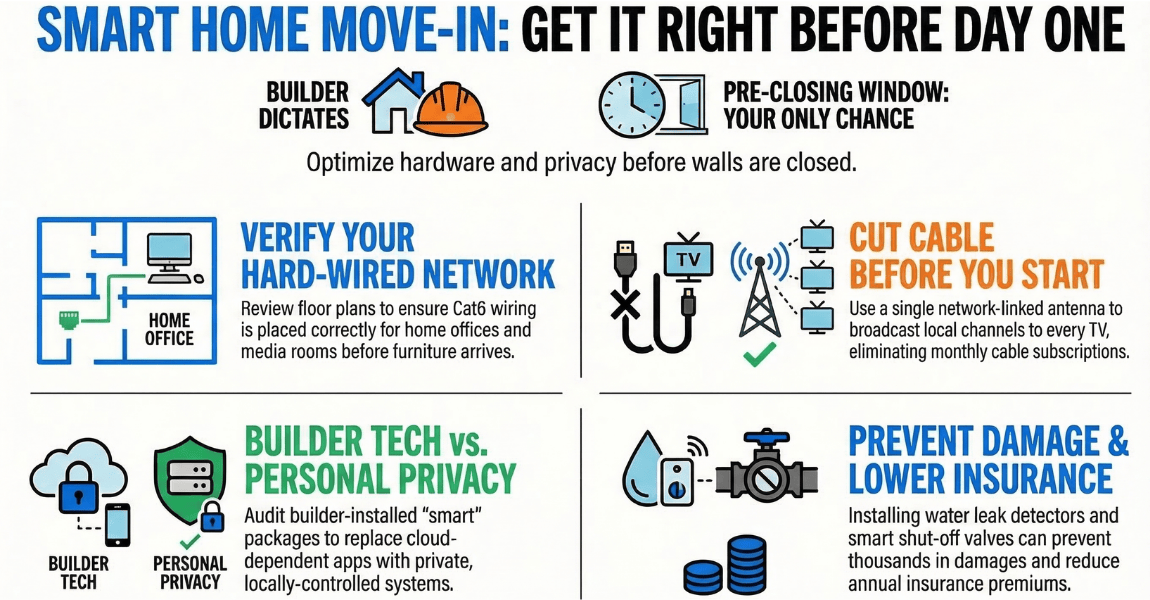
Network and wired connectivity came first. Her housemate’s federal job requires a hard-wired Ethernet connection to her work computer — Wi-Fi wasn’t permitted. Before committing to any router changes, Ashley reviewed the home’s Cat6 wiring layout using the builder’s floor plan, confirming that the library could support a wired drop for the workstation. The recommendation for the time being was for the client to keep using their existing Apple routers, which was practical rather than flashy: keep them for now, save the money, and reassess once they were actually living in the space and could identify what the actual gaps were. No unnecessary upgrades pushed just to push them.
Cable-cutting was a priority, and the solution was cleaner than expected. Rather than running a separate antenna to every room, a single heavy-duty outdoor digital antenna connected to a network TV tuner via coaxial cable was recommended. The tuner connects to the router via Ethernet and broadcasts the OTA signal across the home network — meaning any TV or device can pick up local channels through an app, with no per-room antenna required. Because the Las Vegas broadcast towers are located south of the home, antenna placement was mapped out in advance: south-facing, mounted as high as possible, with room to test positioning before permanent installation. The remaining sports and streaming needs could be met with a streaming service subscription, cutting the traditional cable bill entirely.
The builder’s included smart home package was scoped for review during the closing walkthrough. Rather than accepting the builder’s presentation at face value, the plan was to have Ashley present remotely during the walkthrough itself — asking the right questions about what the system controls, what data it collects, and where it sends it. That kind of independent advocate at closing is something most new homeowners don’t have, and it changes the conversation significantly.
Power resilience was also on the table. The question of what happens when the power goes out — how to stay reachable, keep essential devices running, and charge a phone — was addressed through the recommendation of a UPS (uninterruptible power supply) on the router and any landline or communication devices. A simple, inexpensive layer of protection that most people don’t think about until the power actually goes out.
Finally, water leak protection was scoped as a Phase Two priority — not because it’s less important, but because it makes sense to get settled first, understand the home’s plumbing layout, and then deploy sensors and a main shutoff valve deliberately. Rushing it risks putting sensors in the wrong places. Doing it right means protecting the home for decades.
Confident, Informed, and Ready to Build On
By the time closing day arrived, this homeowner wasn’t walking in blind. She had a clear understanding of her home’s wiring layout, a cable-cutting plan she could implement herself, and an independent expert who had reviewed the builder’s smart home system with her — not just nodding along to the sales pitch.
Her words say it better than any summary could:
“Ashley helped me set up multiple routers for both hard-wire and Wi-Fi coverage, and more recently she has explained the benefits of smart lights, smart thermostats, and water leak detectors. Thanks to her, I am aware that these tools can be added to my home without compromising information privacy and some will reduce home insurance premiums. I will be implementing these tools as I settle into my new home. Her expertise and ability to explain concepts in ‘non-techie’ terms is impressive. I highly recommend her services to anyone needing assistance with smart home technology or IT solutions.” — Melanie, attorney and new build homeowner, Las Vegas area
The foundation is set. The water protection phase is coming. And for the first time in her new home, she knows exactly what she has, what it does, and what she wants to do next — on her own timeline, without pressure, and without compromising her privacy to get there.
-
Client Information
An attorney moving into a new construction home in the Las Vegas area who wanted independent tech guidance before and during closing
-
Service Type
-
Project at a Glance
Smart Home Components Networking, Environmental Sensors Contruction Type New Build Who This Helped Families Seeking Peace Of Mind How We Helped Consulting And Design, Remote Consulting
Smart Home Consulting Questions for New Construction Homeowners
Moving into a new build with included smart home features raises a lot of practical questions, especially around privacy, network reliability, and what's actually worth keeping.
It depends on the platform and how much control you actually have over your data. Many builder-included smart home packages rely on cloud-dependent apps and manufacturer subscriptions that you can't fully control. A short consulting session can help you evaluate what came with your home, identify which features are worth using, and plan a path toward a more private, locally-controlled setup over time, without tearing everything out on day one.
Yes, and a new-construction home is actually a great opportunity to do this right from the start. A single heavy-duty digital antenna connected to a network TV tuner via coaxial cable can broadcast local over-the-air channels across your entire home network, so any TV or device can tune in through an app like Channels. Pair that with a streaming service for sports, and most households find they no longer need a cable subscription.
Builder-installed Cat6 drops vary widely in quality and termination. Before you move furniture and hang TVs, it's worth having someone review your floor plan and wiring diagram to confirm the drops are in the right locations for your actual use, including any home office wired connections, media rooms, and the location of your main network hardware. Catching mismatches before move-in saves a lot of headaches.
After networking, water leak detection is usually the highest-value starting point. A leak sensor paired with an automatic main water shutoff valve can prevent tens of thousands of dollars in damage from a single appliance failure or slow drip behind a wall. After that, smart lighting and thermostat automations add comfort and can meaningfully reduce your homeowner's insurance premium. It's worth asking your insurer what discounts apply.
Remote consulting is highly effective for planning, evaluation, and guidance, especially during the pre-move-in and move-in phase when you're not physically at the property yet. Floor plan reviews, device recommendations, network architecture planning, and builder walkthrough support can all be handled remotely. On-site visits become most valuable for physical installation and configuration work once you're settled in.