
From a Closet Full of Devices to a Working Smart Home: Home Assistant Setup & HomeKit Integration in North Jersey
How a busy dad finally got his Home Assistant Green configured, his Lorex cameras replaced with Reolink, and his whole home talking to HomeKit — without losing a weekend to YouTube.
When the Hardware Is Already There but Nothing Actually Works Together
There’s a particular kind of smart home frustration that doesn’t get talked about enough: the one that comes after you’ve already spent the money.
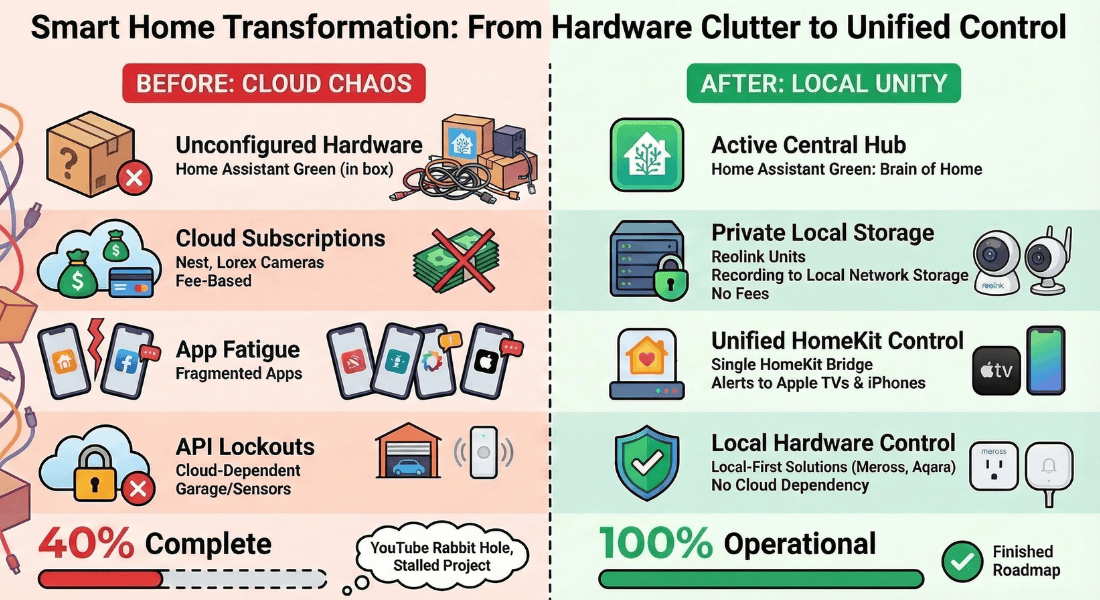
A freelance creative professional and father of two in North Jersey had done everything right on paper. He’d invested in a Home Assistant Green. He’d installed Lutron Caséta smart switches throughout the house. He had a basement server rack. He had Aqara motion sensors still in their boxes. He had Lorex cameras mounted outside. He had Nest cameras running inside — and he hated paying for the subscription every month just to look at his own footage. He had a Chamberlain garage door with no way to get it into HomeKit. And sitting in a closet, unconfigured and waiting: a Home Assistant Green that hadn’t been touched.
By his own estimate, he was about 40% through his planned setup. The problem wasn’t ambition or budget. It was time. With a family to manage and a freelance business to run, the evenings he’d set aside to dig into Home Assistant documentation kept getting swallowed by everything else. He described reaching out to Serenity as wanting someone to “tell him how badly he’d messed up setting it all up himself” — but also, frankly, just wanting someone to come in and get it done.
His wife had a clear preference for Apple HomeKit: she wanted camera alerts and device notifications through their Apple TVs, not through yet another app. That added another layer of complexity — because not all smart home hardware plays nicely with HomeKit, and some of what was already installed actively resisted it.
The goal wasn’t to tear everything out and start over. It was to meet the system where it was, identify what was working and what wasn’t, and build a logical path forward.
Getting Home Assistant Running — and Making It Talk to HomeKit
Ashley arrived for an in-home session with a clear plan: assess what was installed, get the Home Assistant Green up and configured, and begin connecting the hardware that had been sitting dormant.
The first order of business was standing up the Home Assistant Green properly and working through the initial configuration. From there, the HomeKit Bridge integration was added to Home Assistant — which is what allows devices managed by Home Assistant to appear natively inside the Apple Home app. This was the key unlock for the household: it meant that going forward, nearly any device added to Home Assistant could also show up in HomeKit, send notifications to Apple TVs, and work within Apple automations. One integration, one bridge, and suddenly the two ecosystems were no longer competing.
The Lorex cameras were one of the first things to flag. The core issue: Lorex doesn’t support ONVIF, the open standard that Home Assistant’s Generic Camera integration relies on for local discovery. While the cameras technically expose an RTSP stream, they weren’t playing reliably with Home Assistant — and without ONVIF, there’s no path to surfacing those feeds cleanly in HomeKit either. The recommendation was straightforward: start replacing the Lorex units with Reolink cameras, which are part of the official Works with Home Assistant program and have a purpose-built integration. Ashley brought four Reolink E1 Zoom indoor cameras to the visit to begin swapping out the Nest cameras, which carried the same fundamental problem — a mandatory cloud subscription to access any recordings.
Local recording was set up through Home Assistant’s network storage feature, mounting a shared drive so that camera clips could be written directly to local hardware. Trigger-based recording automations were configured so that footage is captured when sensors fire — a door opens, motion is detected — rather than relying on continuous cloud recording. Kid monitoring, in particular, was something this family wanted handled locally and without an ongoing subscription.
The garage door came up as a secondary priority. With a Chamberlain system that had locked down third-party API access, the options were evaluated: Ratgdo (a local-first Wi-Fi control board that installs inside the opener itself), YoLink (a cloud-based button-pusher, easier to install), or the Meross HomeKit Garage Door Opener (the most direct path to native HomeKit integration for existing Chamberlain and LiftMaster hardware). Given the household’s HomeKit-first preferences, Meross was identified as the best fit for their setup — planned for a second phase.
The Lutron Caséta switches — already physically installed — were confirmed to integrate cleanly with Home Assistant via the Caséta integration. The path forward for automated lighting was clear, and the Aqara motion sensors waiting in their boxes were discussed as the next layer to configure.
One Session, a Working Foundation, and a Clear Path Forward
By the end of the visit, the Home Assistant Green that had been sitting in a box was running, configured, and connected. Camera feeds from the new Reolink cameras were visible inside HomeKit. Local recordings were saving to network storage. The HomeKit Bridge was live, meaning every future device added to Home Assistant would have a clear path to showing up in Apple Home.
The household left the session with something more valuable than just a working system: a mental model for how all the pieces fit together, and a prioritized roadmap for what to tackle next. The Lorex outdoor cameras were scheduled for gradual replacement with Reolinks as confidence in the new setup grew. The garage door integration was scoped for a follow-up phase. The Aqara sensors had a clear home in the automation architecture.
For a household that had already made a real investment in smart home hardware, the shift was less about buying new things and more about getting what they’d already paid for to actually work — together, locally, and in a way that fit how the family actually lived.
“I already had most of the hardware — I just didn’t have the time to figure out how to get it all working. After one session I finally understood how everything fit together, and the stuff I’d been putting off for months just got done.” — Lucas, freelance creative professional and dad, North Jersey
-
Client Information
A freelance creative professional and self-described busy dad in North Jersey who had already invested in smart home hardware — including a Home Assistant Green — but hadn't had the time to bring it all together.
-
Service Type
-
Project at a Glance
Smart Home Components Cameras, Lighting, Networking Contruction Type Retrofit Platforms Used Home Assistant Who This Helped Families Seeking Peace Of Mind How We Helped Consulting And Design, Diagnostic And Audit
Home Assistant Setup & HomeKit Integration Questions
Getting Home Assistant talking to HomeKit, and replacing cloud-dependent cameras, raises a lot of practical questions. Here are the ones that came up during this engagement.
Yes. Home Assistant includes a built-in HomeKit Bridge integration that exposes supported entities (including camera streams, locks, lights, and sensors) directly to the Apple Home app. Once added, devices show up natively in HomeKit and can trigger automations or send notifications through Apple TVs and other HomeKit hubs. Lorex cameras proved problematic here because they don't support the ONVIF standard, which is what Home Assistant's Generic Camera integration requires for local discovery.
Lorex cameras don't support ONVIF, the open standard that allows IP cameras to be discovered and controlled locally. While some Lorex models expose an RTSP stream, they didn't reliably integrate with Home Assistant's Generic Camera integration during my testing. For a family wanting their camera feeds visible inside HomeKit without any cloud dependency, Reolink's E1 Zoom (part of the official Works with Home Assistant program) is a significantly better fit.
Home Assistant supports network-attached storage (NAS), which allows you to mount a shared drive and save camera recordings directly to it: no cloud account, no monthly fee. You can set up trigger-based recording automations so a clip is saved whenever a motion sensor fires, a door opens, or any other event occurs. This is exactly how I set up local recording for kid monitoring in this project.
Chamberlain locked down third-party API access, which blocked most local integrations. For a HomeKit-first household, the Meross Smart Garage Door Opener is one of the few options that adds native HomeKit support to existing LiftMaster and Chamberlain openers. For a fully local-first approach, Ratgdo is a Wi-Fi control board that installs directly into the garage door opener and works with Home Assistant without any cloud service. Which option is right for you depends on how comfortable you are with a hardware install.
Not at all. The Home Assistant Green is a solid, ready-to-run hub. The hardware is not the problem for most people. The challenge is the configuration: knowing which integrations to install, how to structure your device architecture, and how to get everything talking to each other reliably. My consulting sessions are designed specifically for people who have the hardware but need an expert to help them get unstuck and moving forward.