
Solution Spotlight: Privacy-First Smart Laundry Reminders for ADHD Households
I Was Sick of Musty Laundry—So I Automated My Way Out of the Problem
Staying on top of laundry has always been my Achilles’ heel. I’d start a load, get pulled into the next task, and only remember hours later—usually when I opened the washer door to that familiar, defeating smell. As someone with ADHD, adding another sticky note or phone alarm wasn’t the answer. I needed a reminder that was quiet, precise, and triggered by the actual event—not an arbitrary timer I’d set and promptly ignore.
My clients face the same friction. Caregivers juggling school pickups and doctor’s appointments. Solo entrepreneurs whose client linens have to be ready. Hands-on landlords coordinating turnover cleans across multiple units. The mental load of tracking household cycles is real, and it lands disproportionately on people who are already running at capacity.
I built a solution in an afternoon using a $35 smart plug, Home Assistant running on local hardware, and an encrypted push notification app. It cost me almost nothing, required zero rewiring, and completely eliminated forgotten loads. Here’s exactly how it works—and why it might be the highest-ROI automation I’ve ever installed.
The smart home content actually worth reading
Why Standard Timers Fail — and How Automation for People with ADHD Works Differently
If timers worked reliably, we’d already be using them. The problem isn’t forgetting to set a timer—it’s that generic timers fire whether or not the machine has actually finished, and they carry zero context. Your brain hears buzz, maps it to nothing concrete, and dismisses it.
The smarter approach is event-driven automation: a notification that fires because the washer finished, not because forty-two minutes elapsed. That specificity changes how your nervous system receives the alert. It’s not noise. It’s useful, actionable information tied to a real moment.
This is exactly why ADHD-friendly home automation works when generic reminders don’t. Automation removes the need to remember a task at all—it just tells you when the task is ready for you.
For renters and apartment dwellers, there’s an added constraint: you can’t hardwire sensors or modify appliances. The plug-based approach I use sidesteps all of that entirely.
The Hardware: One $15 Smart Plug, Zero Rewiring Required
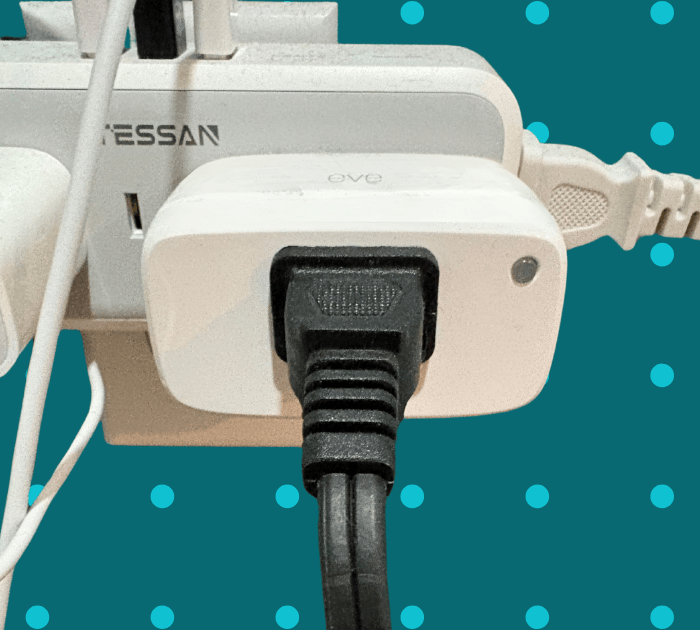
Eve Energy smart plug with power monitoring—renter-friendly and Home Assistant compatible
The whole system rests on one device: a power-monitoring smart plug. It sits between your wall outlet and your washer or dryer, reads the wattage the machine draws in real time, and reports that data back to Home Assistant over your local network.
Before purchasing, confirm two things:
- Wattage rating — Most washers run between 500–1,400 watts; most dryers pull 5,000–6,000 watts on 240V circuits. Match your plug’s rated wattage to your appliance. For standard washers, a plug rated for 1,800 watts works well.
- Protocol compatibility — Choose a plug that speaks a protocol Home Assistant supports natively: Zigbee, Z-Wave, or Matter. This keeps everything local. Wi-Fi plugs often work too, but check whether the manufacturer has a history of pushing cloud-dependent firmware updates.
That’s it for hardware. No new washer. No proprietary hub. No hub subscription. Just a plug.
The Automation Logic: Two Wattage Thresholds, Endless Clarity
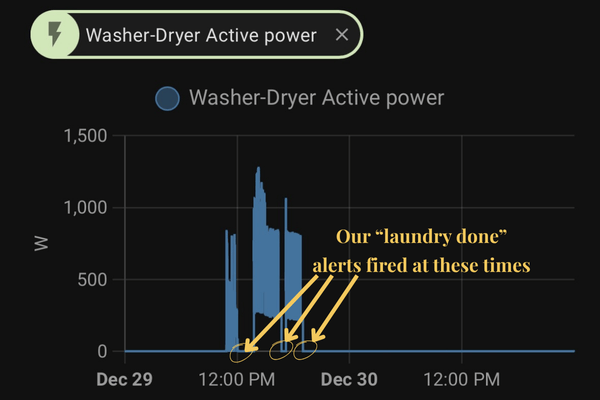
Home Assistant energy graph showing exactly where the laundry-started and laundry-done automations fired relative to power draw
Inside Home Assistant, two simple automations drive everything. You don’t need to write code—these are point-and-click rules in the Automations editor. But if you prefer to work directly in YAML, here’s exactly what both automations look like:
Automation 1 — Laundry Started:
alias: Laundry has started alert
description: ""
mode: single
triggers:
  - type: power
    device_id: 2aca10989236ef447e4dee1960e5d566
    entity_id: 49cc08947ded7c55e3278490f3d64d39
    domain: sensor
    above: 2
    trigger: device
conditions: []
actions:
  - data:
      message: your laundry has started
    action: notify.pushover
When the smart plug reports power draw above 2 watts, Home Assistant fires the start event and sends a Pushover alert. The device-level trigger means Home Assistant is watching the sensor directly—no polling, no delay.
Automation 2 — Laundry Done:
alias: Laundry is done alert
description: ""
mode: single
triggers:
  - type: power
    device_id: 2aca10989236ef447e4dee1960e5d566
    entity_id: 49cc08947ded7c55e3278490f3d64d39
    domain: sensor
    below: 2
    trigger: device
conditions: []
actions:
  - data:
      message: your laundry is done
    action: notify.pushover
When power drops below 2 watts, the completion event fires. On my machine, that transition is immediate and unmistakable—the drop from active draw to near-zero happens in seconds.
A few things worth noting about this YAML:
device_idandentity_idare specific to your smart plug. When you set this up in your own Home Assistant instance, these values will be generated automatically when you select your device in the Automations editor—you won’t need to look them up manually.- The 2-watt threshold works well for my washer, but you’ll want to verify it against your own machine’s energy graph before relying on it. Check the History panel for your plug’s power sensor after running a full cycle—you’ll see exactly where your machine’s baseline sits.
notify.pushovercan be swapped for any notification service Home Assistant supports:notify.mobile_app_your_phone, a smart light flash, a local speaker chime, or any combination.
Calibrating these thresholds to your specific machine takes about two cycles of observation. Once set, you essentially never touch it again.
A note on dryers: The same logic applies, but the wattage numbers are higher—and the installation approach changes. Electric dryers run on 240V circuits and draw 4,000–6,000+ watts during heating, which is well beyond what a standard smart plug can handle. For electric dryers, you’ll need a smart outlet or smart relay rated for 240V installed at the circuit level—and that’s a job for a licensed electrician, full stop. Gas dryers are simpler: the plug only powers the motor (not the heat element), so the draw is typically under 400 watts active and near-zero at idle, which a standard smart plug handles fine. If you’re unsure what you have or what your circuit can support, get a qualified professional to take a look before buying any hardware.
The Notification: Quiet, Encrypted, and Actually Actionable
The Pushover notification as it arrives—one quiet vibration, clear action, no noise
For the notification layer, I use Pushover—a one-time $5 purchase per platform with no ongoing subscription. Home Assistant has a native Pushover integration, so setup takes about ten minutes.
Here’s why Pushover earns its place in a privacy-first setup: every notification payload is end-to-end encrypted before it touches Apple’s or Google’s push infrastructure. Their servers see ciphertext, not message content. Your laundry schedule isn’t being harvested for ad targeting.
The alert I receive is a single quiet vibration on my phone or Apple Watch: “Washer is done—time to flip the load.” One tap, clear action, no second-guessing.
For households that want zero cloud involvement, Home Assistant has you covered with fully local options:
- Flash a smart bulb a specific color (e.g., three quick pulses of blue) when the cycle ends
- Play a soft chime on a local speaker or smart display via the Home Assistant media player integration
- Trigger an on-screen notification through the Home Assistant Companion app, which communicates directly to your phone over your local Wi-Fi—no internet required
Pick the alert style that matches your household’s sensory profile. For ADHD households, a low-friction visual cue often works better than audio; for households with sensory sensitivities, the opposite may be true. You’re in control.
What the Numbers Actually Look Like After 90 Days
This isn’t theoretical. Here’s what changed in my own home after running this automation for three months:
| Metric | Before Automation | After Automation |
|---|---|---|
| Forgotten loads per month | 6–8 | 0 |
| Re-wash cycles needed | 4+ | 0 |
| Average time from cycle end to load transfer | 2+ hours | Under 5 minutes |
| Water and energy wasted on re-washes | Measurable monthly cost | Eliminated |
| Laundry-related mental load | High | Gone |
Four-plus re-wash cycles a month adds up. A standard wash cycle uses roughly 15–30 gallons of water and 0.3–0.5 kWh of electricity. Eliminating those cycles doesn’t just save money—it removes a recurring source of low-grade stress that, for ADHD households, compounds over time.

Your Home Should Work for Your Brain.
For autistic and ADHD adults, families with neurodivergent children, and households where sensory environment, executive function, and routines show up in daily life. The Neurodivergent Household track of the Home Safety and Technology Assessment looks at the friction points generic checklists miss: elopement risk, morning and bedtime failure points, and the specific transitions where your household tends to fall apart. Within 5 business days you get a prioritized written report and a 30-day check-in call to catch what only becomes obvious after a few weeks of real life. AuDHD-informed. In-person in South Jersey, Southeastern PA, and Northern Delaware.
Who Benefits Most From This Setup (Beyond Me)
The moment I had this running reliably, I started recommending it to clients across very different use cases. The $35 hardware investment has a faster ROI than almost anything else in the smart home toolkit.
Overextended caregivers — If you’re managing school schedules, medication times, and your own work deadlines simultaneously, the laundry cycle is one more open loop consuming mental bandwidth. A quiet, precise alert closes that loop without creating new noise in your day.
Solo operators and home-based professionals — Fresh linens matter when clients or colleagues visit your space. A missed laundry cycle the night before a meeting shouldn’t be the thing that throws off your morning. This automation means it never is.
Hands-on real estate investors and short-term rental hosts — Coordinating cleaning crews across turnover days is a logistics puzzle. Knowing exactly when the washer finishes—without being physically present—lets you sequence tasks more efficiently and eliminate idle wait time between loads.

Whether it's household laundry or rental linens, the right alert arrives at exactly the right moment
The Right First Step in Sensory-Friendly Home Automation for Neurodivergent Households
If you’re new to Home Assistant or smart home automation, this project is the ideal starting point—not because it’s the flashiest, but because it delivers immediate, tangible results with minimal complexity.
1. The ROI is immediate. A $35 smart plug pays for itself the first month you stop rewashing mildewed clothes. There’s no subscription, no ecosystem lock-in, and no recurring cost after the initial setup.
2. Your data stays home. Every energy reading, every automation trigger, every cycle history lives on hardware inside your four walls. If you choose a fully local notification method, nothing leaves your network at all. For families already uncomfortable with how much data smart devices collect, this matters.
3. Gentle reminders respect neurodivergent minds. There’s a meaningful difference between a jarring alarm that fires whether or not you can act on it, and a quiet, event-triggered nudge that arrives at exactly the right moment. The latter works with your brain’s attention patterns rather than against them. If you want to explore what a full system designed around your household’s needs looks like, our smart home solutions for ADHD and autistic families page walks through the complete picture.
Ready to Put Laundry—and Your Mental Load—on Autopilot?
I turned my own chaos into a calm, repeatable system. It took an afternoon, cost less than dinner out, and eliminated one of the most persistent sources of friction in my household. That’s the promise of thoughtful smart home automation: not gadgetry for its own sake, but technology that quietly handles the things that cost you the most mental energy.
Whether you want to start with a single smart plug or build out a comprehensive, privacy-first automation system for your home, the path forward looks the same: a conversation about what’s actually getting in your way.
Book a free 30-minute discovery call and I’ll listen to your household’s real friction points and map out the automations that will make the biggest difference fastest. No tech background required, no pressure, no sales pitch. The Neurodivergent Household Home Safety and Technology Assessment is available in-person across South Jersey, Southeastern PA, and Northern Delaware. The Remote Safety Snapshot is available anywhere in the world.