
Getting a Privacy-First Smart Home Plan Right for a Retrofitted New York Property
How two tech-savvy homeowners got a phased roadmap for Home Assistant, whole-home Wi-Fi, and Mitsubishi HVAC automation, without a single cloud dependency.
When Good Hardware Meets the Wrong Architecture
They’d done a lot of things right. Two roommates who’d co-purchased a multi-story older home in upstate New York had already invested in quality infrastructure: Ubiquiti UniFi networking gear, Philips Hue lighting with Lutron Aurora dimmers, AirThings air quality sensors, and a serious five-zone Mitsubishi heat pump system. One of them worked in cybersecurity, the other in software engineering. These weren’t people who needed to be talked into caring about privacy — they already understood the risks of cloud-dependent platforms. They just needed someone to tell them how to build what they actually wanted.
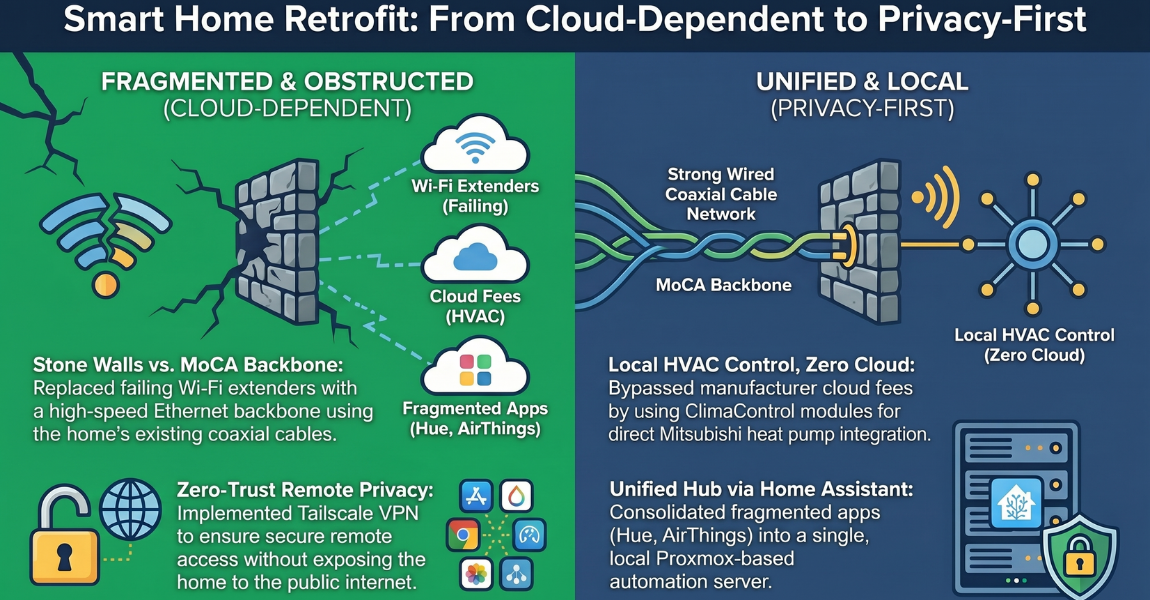
The problem was the house itself. Stone walls — the kind that give older homes their character — are brutal on Wi-Fi. Signals don’t propagate through them the way they do through drywall. The home had an existing coaxial cable run through the walls, and the household had tried to use ScreenBeam MoCA adapters to bridge the gap between floors. But a faulty power supply on one of the adapters had never been replaced. The result: a center-floor U6 Pro access point that was essentially orphaned, a Beacon HD extender on the top floor struggling to push signal through the stone, and a home office on the upper level where connectivity was unreliable for daily remote work.
The HVAC situation was its own puzzle. The five-zone Mitsubishi heat pump system was excellent hardware — but the thermostats were basic wireless units with no smart home integration. The manufacturer’s official solution, Kumo Cloud, would have cost considerably more per zone and routed all climate data through Mitsubishi’s servers. That wasn’t something either homeowner was willing to accept. They’d heard there were local-first alternatives, but verifying compatibility for their specific equipment required research they hadn’t had time to do.
And underneath all of this was a more fundamental gap: no unified platform tying it together. The Hue lights lived in one app. The AirThings sensors lived in another. There was no Home Assistant instance, no automation logic, no way to trigger a “we’re leaving” sequence or have the house warm up before they arrived after the train ride from the city.
They reached out to Serenity wanting a plan — a clear, prioritized roadmap for turning what they’d already bought into a system that actually worked together, locally, and without monthly fees.
A Phased Roadmap Built Around What Was Already There
Ashley’s approach on engagements like this one is always the same: start with what’s working and build outward, rather than recommending a tear-out. The goal in the first consultation call was to understand the full scope of the existing infrastructure, identify the actual failure points, and then design a path that made the most of hardware the homeowners had already paid for.
Phase 1: Fix the Network Foundation
The coaxial cable already running through the house turned out to be the most important asset. Rather than budgeting for an electrician to run Cat6 through stone walls, the plan centered on maximizing the existing coax with ScreenBeam MoCA adapters — a technology that converts coaxial cable into a wired Ethernet backbone. The immediate action was simple: replace the power supply on the center-floor ScreenBeam adapter that had gone dead. That single fix would restore the U6 Pro on the center level to wired performance.
For the top floor, where connectivity was worst, the recommendation was a third ScreenBeam adapter paired with an additional U6 Pro — placed in the room used as a home office, where reliable connectivity was non-negotiable. The existing Beacon HD extender could then be repositioned to serve the living area on the other side of the stone wall, where it would be on the same radio frequency path as the Dream Router below. All access points were recommended for ceiling mounting, which maximizes coverage relative to wall-mounted placement.
One targeted Cat6 drop was identified as worth running — across the stone wall in the main floor living room, especially since an electrical project was already being planned for that area — but it was scoped as optional rather than required to get the system functioning.
Phase 1.5: Home Assistant Deployment
With a solid network foundation in place, the next step was standing up the automation hub. The design called for a purpose-sized mini PC running Home Assistant via Proxmox virtualization — giving the homeowners service isolation, easy snapshots, and professional-grade backup capabilities. Supporting services would run as individual containers: an MQTT broker for local device communication and Z-Wave JS for sensor management.
This architecture — local processing, open-source foundation, no cloud services in the critical path — was specifically designed so that no vendor’s business decision could break the system. When Chamberlain pulled API access from third-party garage apps, or Belkin ended support for the Wemo line, homes built on cloud dependencies were left stranded. This one wouldn’t be.
Phase 2: HVAC Automation Without the Cloud
The Mitsubishi system required careful research. After the client shared the model numbers for the outdoor heat pump units and indoor ducted air handlers, Ashley confirmed that the indoor units included a CN105 control port — the interface that ClimaControl modules use to communicate directly with the unit. Five ClimaControl modules, one per zone, would connect to those ports and communicate with Home Assistant over local MQTT. No Mitsubishi cloud account, no internet dependency, and the hardware cost for all five zones was a fraction of what Kumo Cloud adapters would have run.
The planned HVAC automation logic included geofencing-based scheduling — a particularly high-value feature here, because the train commute from the city is predictable enough that Home Assistant can begin conditioning a zone 60 minutes before arrival. The home would be comfortable the moment they walked in, without running the system all day.
Phases 3 and Beyond: Sensors, Monitoring, and Automation Logic
The Philips Hue ecosystem was confirmed as a strong foundation — the Hue hub integrates with Home Assistant over a local connection, no cloud dependency required, and the quality and reliability of the platform justify keeping it long-term. The AirThings sensors were a different story: they currently work through a cloud API, which creates the same vendor-dependency risk seen with other platforms. The recommendation was to use what was already installed but avoid expanding that ecosystem further. Z-Wave Long Range sensors — the Shelly Wave H&T, at a fraction of the cost of an additional AirThings sensor — would serve the same function locally for any future expansions.
Given the home’s history with water intrusion — a burst pipe in the guest studio had triggered mold remediation — sump pump monitoring was included as a Phase 3.5 priority. A Zooz ZSE42 Z-Wave leak sensor at the critical water level, paired with a Shelly smart plug monitoring the sump pump’s power draw, would give early warning of both moisture intrusion and pump failure, with all alert logic running locally on Home Assistant.
Guidance That Got Put to Work Immediately
The value of a consulting engagement is only as real as what the client does with it. In this case, the network recommendations started going into effect before the full roadmap was even finalized.
After receiving Ashley’s detailed writeup on the ScreenBeam configuration — including a per-floor placement strategy and the specific power adapter needed to restore the failed center-floor unit — the client confirmed that they’d already replaced the power supply on the dead adapter and ordered a second unit for the top floor. The connectivity improvement was meaningful enough that he wrote back specifically to call it out: the guidance had been critical to getting the upper floor functioning reliably for remote work.
The HVAC compatibility question got answered definitively as well. After the client shared photos of every equipment label he could locate on the system, Ashley confirmed the indoor units were fully compatible with ClimaControl, attached the wiring diagram for the HVAC contractor’s reference, and outlined what the Home Assistant MQTT integration would look like once those modules were installed. That research alone — verifying the right accessory for a specific, non-standard multi-zone Mitsubishi system — is the kind of thing that would have taken hours of forum-digging and still might not have produced a confident answer.
What this household left the engagement with wasn’t just a document — it was a clear sequence of decisions, a vetted device list, and the confidence that the path they were about to build wasn’t going to paint them into a corner. The system they implement will run locally, respond in milliseconds, and keep working regardless of what any vendor decides to do with their cloud service.
“Your earlier guidance has been really helpful… Your guidance here has been critical.” — Software engineer and co-homeowner, New York
-
Client Information
Two tech-savvy co-homeowners who use a multi-story upstate New York property as their primary residence while working remotely. One in cybersecurity, one in software engineering.
-
Service Type
-
Project at a Glance
Smart Home Components Networking, Climate Control, Environmental Sensors, Water Protection Contruction Type Retrofit Platforms Used Home Assistant Who This Helped Families Seeking Peace Of Mind How We Helped Consulting And Design, Remote Consulting
Smart Home Consulting Questions from This Project
Planning a Home Assistant setup in an older home with challenging architecture raises real questions. Here are the ones that came up during this engagement.
Yes, and in many cases the home already has coaxial cable running through the walls that can do the job. I used ScreenBeam MoCA adapters to convert the existing coax infrastructure into a wired Ethernet backbone for UniFi U6 Pro access points on each floor. This eliminated the need for a full Cat6 pull and gave the home significantly better coverage than a Wi-Fi mesh extender ever could through stone walls.
Yes. Mitsubishi's own Kumo Cloud wireless adapter is the manufacturer-supported option, but it requires internet connectivity to function and routes your climate data through Mitsubishi's servers. ClimaControl modules connect directly to the CN105 port on compatible Mitsubishi indoor units and communicate with Home Assistant over local MQTT: no cloud, no subscription, no service-deprecation risk. For a five-zone system, the cost difference between ClimaControl and Kumo Cloud is substantial.
Real, and documented. AirThings devices currently integrate with Home Assistant through a cloud API, which means AirThings could restrict or revoke third-party access at any time, just as Chamberlain did with the MyQ garage API and Belkin did with the Wemo line. For existing devices it's reasonable to use what you have, but I recommend against expanding cloud-dependent ecosystems. Z-Wave Long Range sensors like the Shelly Wave H&T offer similar functionality with local, standards-based communication that no vendor can take away.
Home Assistant's companion app tracks your phone's location and can trigger automations based on arrival and departure. For a property where the commute is predictable (say, a 60-90 minute train ride), you can set the home to begin heating or cooling a zone before you arrive, so the space is comfortable the moment you walk in without running the HVAC all day. This is one of the clearest ROI wins for any vacation or secondary property.
The Remote Safety Snapshot is designed exactly for this. I map out your current infrastructure, identify what's working and what's blocking you, research device compatibility for your specific hardware, and deliver a prioritized phased roadmap. You leave with a written report you can execute yourself, hand to a contractor, or use as the foundation for whatever comes next.