From Manual Switches to a Smarter Practice: Smart Office Automation Consulting for a South Jersey Chiropractor
How a Voorhees chiropractic office eliminated daily lighting walk-arounds, improved patient flow, and unified a fragmented app ecosystem, without replacing a single piece of existing equipment.
Why a South Jersey Chiropractic Practice Was Running Smarter Equipment Than Its Lighting
There’s a particular kind of operational friction that builds up slowly in a small practice — so gradually that it starts to feel normal. For a busy chiropractor in a South Jersey suburb, that friction had taken the form of a daily ritual: walking the entire office every morning to flip lights on manually, and walking it again every evening to turn them off.
It wasn’t just inconvenient. It was incongruous. The practice had a Honeywell smart thermostat, an Ultraloq smart lock, and over a dozen Eightree smart plugs powering treatment equipment — all managed through the Smart Life app on a shared staff iPad. The audio system ran Bose ceiling speakers in the main area and Yamaha speakers in the spa rooms, each with its own dedicated app. By any measure, this was a tech-forward office. And yet, every single light switch was manual.
The patient-flow side of the practice had its own friction. Patients rotated through adjustment, traction, and electro-stim therapy stations in separate spa rooms. Tracking electro-stim session times was done by feel — staff either checked in too often, interrupting a patient mid-session, or lost track entirely during a busy afternoon and left someone waiting. There was also no way for a patient receiving stim treatment to call for help if they needed it. The practice had invested in a solid set of smart devices, but they lived in silos. Nothing talked to anything else, and the staff was carrying the cognitive load that automation should have been handling.
Ashley conducted an on-site walk-through, spending time with the chiropractor to understand both the physical layout and the daily workflow before making a single recommendation.
Designing a Lighting and Patient-Flow System That Fits the Practice — Not the Other Way Around
The first principle of the engagement was straightforward: don’t replace what’s working. The existing smart plugs, thermostat, lock, and audio systems were all left in place. The goal was to fill the specific gaps that were costing the practice time and attention every day.
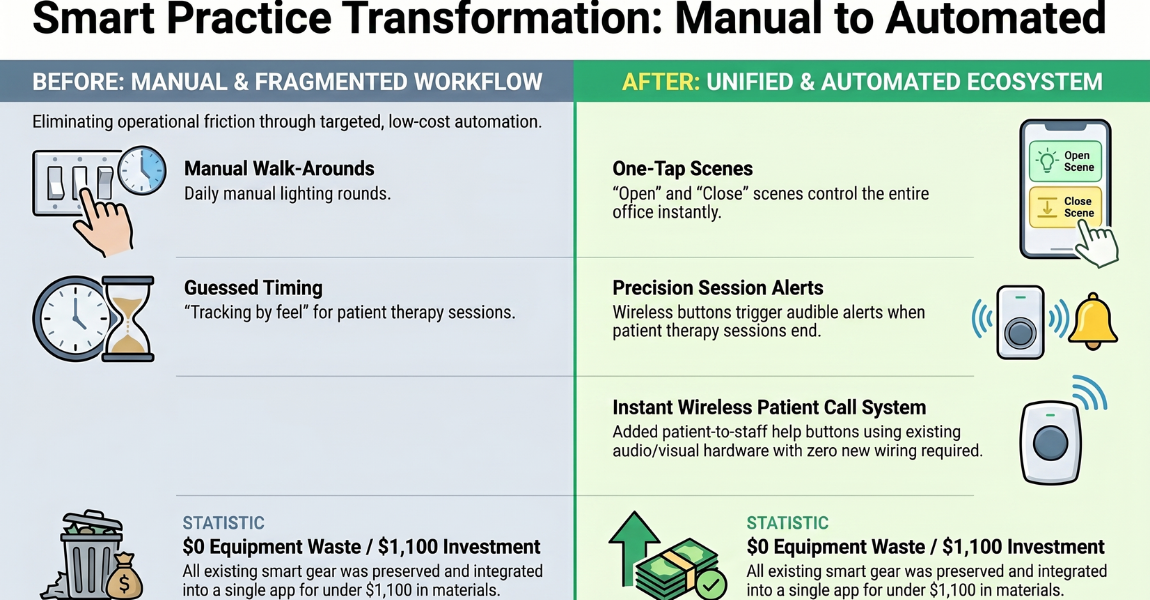
Lighting automation was the most immediate win. The recommendation was to replace five manual switches — covering the hallway, reception area, and restroom — with Lutron Caséta smart switches and dimmers. Lutron Caséta was the right choice here for two reasons: it’s one of the most reliable smart switch ecosystems available, and it integrates cleanly with Smart Life, the platform the staff was already using. Rather than introducing a new app or a new learning curve, the smart switches would slot directly into the existing workflow. One scene to open the office. One scene to close it. No more walk-arounds.
In the restroom, a motion sensor paired with a smart switch would handle vacancy automatically — lights on when someone enters, off when they leave. In each spa room, PIR occupancy sensors linked to dimmers would do the same, with the added benefit of triggering dimming scenes appropriate for treatment without any manual adjustment.
Spa-room alerting addressed the session-tracking problem directly. A battery-powered wireless smart button at each treatment station — no wiring, no contractor needed — would give staff a one-press way to start a countdown timer at the beginning of a stim session. At one minute remaining and again at completion, audible and visual alerts would fire at both the front desk and the back treatment area. Staff would know exactly when to check in without hovering or guessing.
Patient call buttons added a second wireless button beside each treatment table, giving patients a way to request assistance during a session. The same alert infrastructure — Google Home Minis for audible cues, color-changing smart lights for visual ones — would handle call button presses as well as session timer alerts. One hardware layer, two use cases.
The rollout was designed as a three-week sequence: smart switches and sensors installed first, timers and call buttons in week two, and a 30-minute staff training session in week three covering scene use, timer responses, and basic troubleshooting.
Secondary observations — uneven HVAC temperatures between the reception area and treatment rooms, and an opportunity to group existing smart plugs into named scenes for a faster open/close process — were logged for future budgeting, not pushed as immediate action items.
One Consultation, Two Quick Wins, and a Practice That Runs More Smoothly
The outcome of this engagement wasn’t a dramatic hardware overhaul — it was a targeted set of recommendations that addressed exactly the right problems. Lighting automation and spa-room alerting were identified as the two highest-impact changes the practice could make, and the entire design was built around integrating with what was already there rather than replacing it.
For a practice treating multiple patients simultaneously across multiple rooms, the difference between a staff member who has to physically manage lights and timers and one who can trust the system to handle it is measured in patient attention and operational calm. Smart switches that open and close the office in one tap. Session timers that alert without interrupting. Call buttons that give patients a voice without requiring anyone to hover.
The hardware investment for all four action items — switches, sensors, buttons, and alert devices — came in well under $1,100 in materials, with approximately seven hours of installation and training labor.
“Ashley from Serenity Smart Homes is highly recommended!! She gave me some creative and incredible ideas to make my office so much more efficient, reduce staff workload and create a better experience for both the office staff and patients!” — Danny, chiropractor, South Jersey
-
Client Information
A chiropractor running a busy multi-room practice in a South Jersey suburb, treating multiple patients simultaneously across adjustment, traction, and electro-stim therapy stations
-
Service Type
-
Project at a Glance
Smart Home Components Lighting, Environmental Sensors, Voice Control Contruction Type Small Office Who This Helped Solo Business Owner How We Helped Consulting And Design
Smart Office Automation Questions from This South Jersey Project
Automating a professional practice raises different questions than a home. Here's what came up during this engagement, and what's worth knowing if you're running a small office of your own.
Yes. Lutron Caséta smart switches and dimmers are compatible with the Smart Life ecosystem, which means you can tie your new lighting controls into the same app your team is already using for other devices. This is exactly what I recommended here. Rather than introducing yet another app, the new switches slot into the existing workflow so staff can open and close the office with a single tap.
Battery-powered wireless smart buttons placed at each treatment station are a simple, low-cost solution. A single press starts a countdown timer; when the session is nearly complete, it triggers an audible or visual alert at the front desk or back treatment area. No app required on the patient's end, and no need for staff to constantly check in. It keeps the treatment experience consistent and frees up attention for other patients.
Wireless smart buttons can be mounted beside each treatment table and paired with a Google Home Mini or a color-changing alert light at the nurse's station or reception area. When a patient presses the button, staff get an immediate audio or visual cue, with no wiring required and no disruption to existing infrastructure. The same hardware can serve double duty as both a call button and a session timer trigger.
Almost never. In this project, the existing smart plugs, thermostat, smart lock, and audio systems all stayed in place. The goal was to fill in the gaps (specifically, the manual lighting and the missing patient-flow tools) and layer on the automation logic that ties everything together. A good consultation starts with what you already own before recommending anything new.
Absolutely, and it should. The entire design philosophy here was to reduce the number of steps staff have to take, not add new ones. One-tap open and close scenes, hands-free bathroom lighting, and automatic session alerts all work in the background. The team doesn't need to understand how any of it works. It just does.